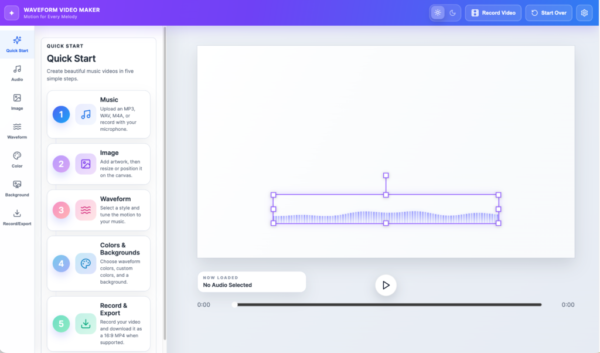
How to Use
Create Videos for Any Use
1. Upload Audio
2. Upload Images
3. Choose Waveform
4. Customize Visualization
5. Download MP4
Upload your music, images, and video, and customize stunning waveform animations, and export professional MP4 videos or collage PNG.




The Video Editor:
13+ Visualization Modes
Choose from waveform bars, circular spectrums, and animated patterns to match the mood of your music.
Style Possibilities
Customize colors, backgrounds, glow effects, multiple images, and visual themes with complete creative freedom. Add text or work with fade-ins and transitions. Extract audio while blending images and video.
Easy MP4 Export
Record and export beautiful, high-resolution videos in just a few clicks.
Everything is Effortless:
Professional multi-track video editing
Whether you’re adding a waveform, image, audio, or video, the multi-track can work with all media. Local projects that reopen exactly where you left off. Super Studio intelligent video presets.
Image collages, typography, layered canvas design
Creative effects and motion controls, ready-made layouts for every major social platform. Audio extraction.
Dedicated Studio Mode for immersive video editing
Fast exports with a modern rendering engine. Beautiful transitions, fades, slides, and dips.

Discover
Everything you need is on the timeline to get the most from Waveform.
All Music Formats Accepted
Supports MP3, WAV, FLAC, AAC, and other popular audio formats, so you can start creating with the music you already have.
Custom Styles & Visual Effects
Personalize every detail in Waveform Studio with custom colors, backgrounds, and multiple waveform styles. From elegant line waves to vibrant circular visualizations, create moving artwork that reflects your music and style.
Visual Composer
Easily position your artwork on the timeline and on the intuitive canvas with controls for size, spacing, and alignment. Editable width and height settings, along with center guides for both waveforms and imagery, make it easy to create beautifully balanced compositions that feel uniquely yours. Create image collages or image slides.
Quality Assurance
The videos created with Waveform Studio and your music, images, and waveforms are delivered in a professional, high-resolution MP4 format.